Apple Changes iPad Mute Switch to Screen Rotational Lock
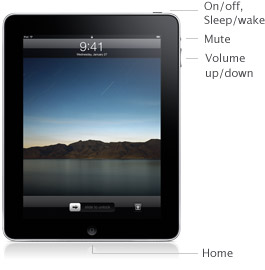
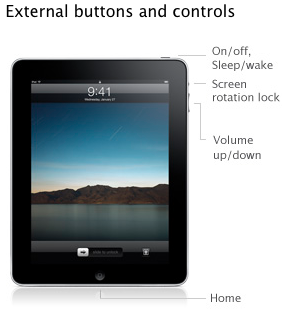
Apple has changed the specifications of the new iPad to show a screen rotational lock in place of a mute switch.
One of the quirkier details is that what was previously known as the mute switch on the iPad -- similar to the one on the iPhone -- is now known as the "screen rotation lock" on Apple's website.
9to5Mac noticed the updated diagram earlier today. They also observed that the specs now say the iPad can also play Motion JPEG (M-JPEG) up to 35 Mbps, 1280 by 720 pixels, 30 frames per second, audio in ulaw, PCM stereo audio in .avi file format
----------------------------------------------------------------------------------------------
Apple Details How iPad 3G Service Works
Apple has posted a new page detailing how 3G service for the new iPad will work
Take a network with you wherever you go.
iPad with Wi-Fi + 3G offers superfast data speeds up to 7.2 Mbps over 3G cellular networks around the world. It’s perfect when you’re out and about with no access to a Wi-Fi network, because you can still get a fast connection for surfing the web, sending and receiving email, or getting directions. Since iPad seamlessly switches between 3G and even faster Wi-Fi, you always get the best connection available. And with AT&T data plans, you’ll have access to over 20,000 Wi-Fi hotspots, including Starbucks, Barnes and Noble, and more.
AT&T 3G Data Plans for iPad
Data per month Price per month
250MB $14.99
Unlimited $29.99
No-contract 3G service
In the United States, 3G service is available through a breakthrough deal with AT&T. You choose the amount of data per month you want to buy — 250MB or unlimited. If you choose the 250MB plan, you’ll receive onscreen messages as you get close to your monthly data limit so you can decide whether to turn off 3G or upgrade to the unlimited plan. Best of all, there’s no contract. So if you have a business trip or vacation approaching, just sign up for the month you’ll be traveling and cancel when you get back. You don’t need to visit a store to get 3G service. You can sign up, check your data usage, manage your account, or cancel your service — all from your iPad.
Sign up on your iPad
You can sign up for 3G data service with AT&T at any time — right on your iPad. There’s no need to visit a store or call customer service. Just tap Settings and choose Cellular Data. Then type in your user information, select a plan, and enter your credit card information.
Monitor your data usage
You can check your data usage in Settings on your iPad anytime. And iPad will even let you know when you’re running out. You’ll get three alerts as you near your 250MB limit — at 20 percent, 10 percent, and zero. With each alert, you can choose to add more data or wait and do it later. Tap Now and iPad opens the Cellular Data Plan window so you can update your data plan.
Manage your data plan
iPad makes it easy to choose the data plan that works best for you. When you need more data, you can add another 250MB or upgrade to the Unlimited Data plan. Because you sign up for a data plan in monthly increments, you can cancel your plan at any time and then sign up again whenever you need 3G service.
----------------------------------------------------------------------------------------------
Apple Starts Accepting iPad Pre-orders [Updated]
*Update: Here are the shipping dates as currently listed:
iPad (Wifi) - DELIVERS ON 4/3
iPad (3G) - Late April
iPad Keyboard Dock - Apr 20
iPad Case - BY APRIL 3RD
iPad Dock - BY APRIL 3RD
iPad Dock Connector to VGA Adapter - BY APRIL 3RD
*The iPad Camera Connection Kit is not yet available for order.
Apple has changed the specifications of the new iPad to show a screen rotational lock in place of a mute switch.
One of the quirkier details is that what was previously known as the mute switch on the iPad -- similar to the one on the iPhone -- is now known as the "screen rotation lock" on Apple's website.
9to5Mac noticed the updated diagram earlier today. They also observed that the specs now say the iPad can also play Motion JPEG (M-JPEG) up to 35 Mbps, 1280 by 720 pixels, 30 frames per second, audio in ulaw, PCM stereo audio in .avi file format


----------------------------------------------------------------------------------------------
Apple Details How iPad 3G Service Works
Apple has posted a new page detailing how 3G service for the new iPad will work
Take a network with you wherever you go.
iPad with Wi-Fi + 3G offers superfast data speeds up to 7.2 Mbps over 3G cellular networks around the world. It’s perfect when you’re out and about with no access to a Wi-Fi network, because you can still get a fast connection for surfing the web, sending and receiving email, or getting directions. Since iPad seamlessly switches between 3G and even faster Wi-Fi, you always get the best connection available. And with AT&T data plans, you’ll have access to over 20,000 Wi-Fi hotspots, including Starbucks, Barnes and Noble, and more.
AT&T 3G Data Plans for iPad
Data per month Price per month
250MB $14.99
Unlimited $29.99
No-contract 3G service
In the United States, 3G service is available through a breakthrough deal with AT&T. You choose the amount of data per month you want to buy — 250MB or unlimited. If you choose the 250MB plan, you’ll receive onscreen messages as you get close to your monthly data limit so you can decide whether to turn off 3G or upgrade to the unlimited plan. Best of all, there’s no contract. So if you have a business trip or vacation approaching, just sign up for the month you’ll be traveling and cancel when you get back. You don’t need to visit a store to get 3G service. You can sign up, check your data usage, manage your account, or cancel your service — all from your iPad.
Sign up on your iPad
You can sign up for 3G data service with AT&T at any time — right on your iPad. There’s no need to visit a store or call customer service. Just tap Settings and choose Cellular Data. Then type in your user information, select a plan, and enter your credit card information.
Monitor your data usage
You can check your data usage in Settings on your iPad anytime. And iPad will even let you know when you’re running out. You’ll get three alerts as you near your 250MB limit — at 20 percent, 10 percent, and zero. With each alert, you can choose to add more data or wait and do it later. Tap Now and iPad opens the Cellular Data Plan window so you can update your data plan.
Manage your data plan
iPad makes it easy to choose the data plan that works best for you. When you need more data, you can add another 250MB or upgrade to the Unlimited Data plan. Because you sign up for a data plan in monthly increments, you can cancel your plan at any time and then sign up again whenever you need 3G service.
----------------------------------------------------------------------------------------------
Apple Starts Accepting iPad Pre-orders [Updated]
*Update: Here are the shipping dates as currently listed:
iPad (Wifi) - DELIVERS ON 4/3
iPad (3G) - Late April
iPad Keyboard Dock - Apr 20
iPad Case - BY APRIL 3RD
iPad Dock - BY APRIL 3RD
iPad Dock Connector to VGA Adapter - BY APRIL 3RD
*The iPad Camera Connection Kit is not yet available for order.