
A hacker has taken over numerous Dutch iPhones asking for a €5 donation for his troubles.
The hacker simply scanned for jailbroken iPhones with SSH installed and using the default root password. With this password he then sent what appears to be an SMS alert to the hacked phones that read,
"Your iPhone's been hacked because it's really insecure! Please visit doiop.com/iHacked and secure your iPhone right now! Right now, I can access all your files."
Going to the website directed users to send €5 to a PayPal account, after which they would be e-mailed instructions to how remove the hack.
"If you don't pay, it's fine by me, but remember, the way I got access to your iPhone can be used by thousands of others-they can send text messages from your number (like I did), use it to call or record your calls, and actually whatever they want, even use it for their hacking activities! I can assure you, I have no intention of harming you or whatever, but, some hackers do! It's just my advice to secure your phone."
The webpage has since been taken down and the hacker is now offering instructions on removing the hack for free.
If you know what SSH is and have it installed remember to turn it off when not in use or change the default password to prevent this hack.
[slika više nije dostupna]
How to Change the Root Password on Your iPhone
These are instructions on how to change the root password on your jailbroken iPhone or iPod touch. This password is required when using SSH to connect to your device.
Step One
If you do not already have MobileTerminal installed please follow these instructions to install it.
Step Two
Press to launch MobileTerminal from your iPhone Springboard.

Step Three
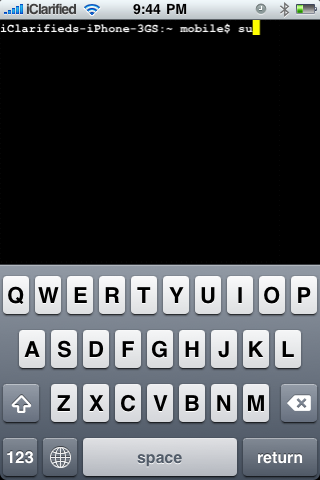
Input su into the terminal window then press the return key.
Step Four
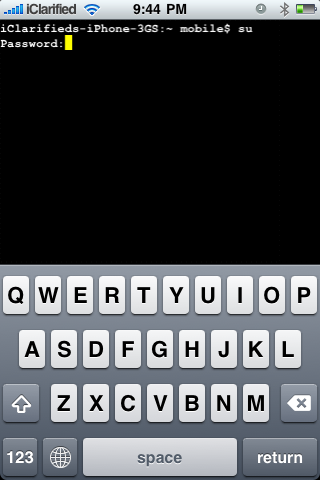
You will be asked to input the current root user password. Input alpine then press the return key.
Step Five
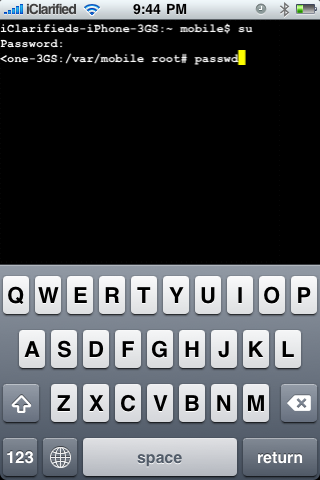
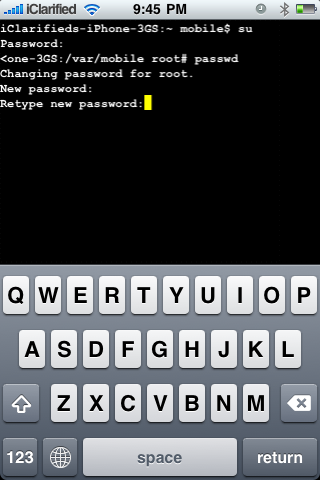
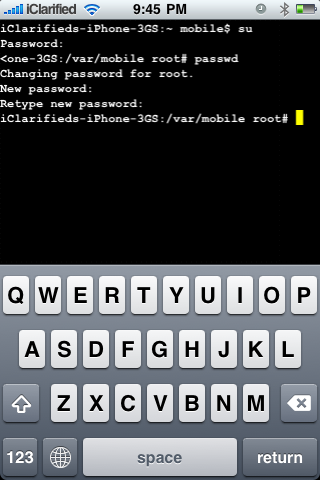
Once you have logged in as the root user input passwd into the terminal window then press the return key
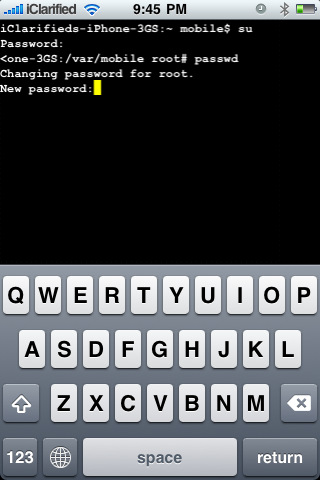
You will be prompted for new password. Input a password of your choice then press the return key.
You will be asked to retype the new password. Do this, then press the return key to finalize your change
The hacker simply scanned for jailbroken iPhones with SSH installed and using the default root password. With this password he then sent what appears to be an SMS alert to the hacked phones that read,
"Your iPhone's been hacked because it's really insecure! Please visit doiop.com/iHacked and secure your iPhone right now! Right now, I can access all your files."
Going to the website directed users to send €5 to a PayPal account, after which they would be e-mailed instructions to how remove the hack.
"If you don't pay, it's fine by me, but remember, the way I got access to your iPhone can be used by thousands of others-they can send text messages from your number (like I did), use it to call or record your calls, and actually whatever they want, even use it for their hacking activities! I can assure you, I have no intention of harming you or whatever, but, some hackers do! It's just my advice to secure your phone."
The webpage has since been taken down and the hacker is now offering instructions on removing the hack for free.
If you know what SSH is and have it installed remember to turn it off when not in use or change the default password to prevent this hack.
[slika više nije dostupna]
How to Change the Root Password on Your iPhone
These are instructions on how to change the root password on your jailbroken iPhone or iPod touch. This password is required when using SSH to connect to your device.
Step One
If you do not already have MobileTerminal installed please follow these instructions to install it.
Step Two
Press to launch MobileTerminal from your iPhone Springboard.
Step Three
Input su into the terminal window then press the return key.
Step Four
You will be asked to input the current root user password. Input alpine then press the return key.
Step Five
Once you have logged in as the root user input passwd into the terminal window then press the return key
You will be prompted for new password. Input a password of your choice then press the return key.
You will be asked to retype the new password. Do this, then press the return key to finalize your change


